CRM vs Excel for Student Recruitment
Quick Answer
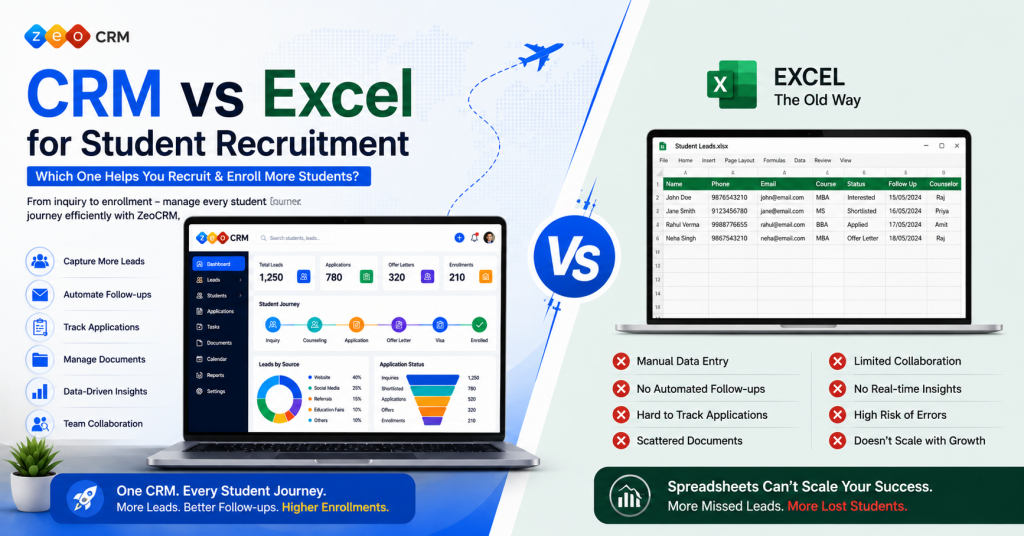
Excel works fine for a solo consultant handling a handful of leads a week. Once inquiries grow, teams expand or follow ups start slipping, a CRM becomes the better option. A student recruitment CRM automates follow ups, centralizes records and gives visibility that a spreadsheet simply cannot match at scale.
Introduction
Most education consultancies start the same way. A founder, a laptop and an Excel sheet with columns for name, phone number and status. It works fine at first. Then the leads start coming in faster than anyone can update the sheet, and the same student ends up on three different rows because nobody noticed the duplicate entry.
Excel is excellent for starting out but not for scaling a student recruitment business. At ZeoCRM we have seen this exact pattern play out with dozens of growing consultancies. This article breaks down CRM vs Excel for student recruitment services, where each one actually shines, and how to know when it is time to make the switch.
TL;DR
- Excel is affordable and familiar but was never built for a growing student pipeline
- A student recruitment CRM automates follow ups, centralizes data and scales with your team
- Feature by feature, CRM outperforms Excel on almost every operational task
- Solo consultants with low lead volume can still get by with a spreadsheet
- Seven clear signs tell you when your consultancy has outgrown Excel
What Is Excel Used for in Student Recruitment?
Excel or Google Sheets is usually the first tool any consultancy reaches for, mainly because it is already installed and everyone already knows how to use it.
- Tracking student leads by adding rows manually as inquiries come in through calls, forms or referrals
- Recording contact details like names, phone numbers, emails and preferred destinations in separate columns
- Managing application status through a column updated by hand each time a student moves to a new stage
- Simple reporting using basic counts and filters to get a rough sense of pipeline volume
- Team sharing with Google Sheets, though conflicts and overwritten rows become common once more than a couple of people are editing it at once
What Is a Student Recruitment CRM?
A
student crm system is software built specifically to manage the student journey from first inquiry through enrollment, rather than a generic table of rows and columns.
A spreadsheet stores data. A CRM acts on it, sending reminders, assigning leads and tracking every interaction automatically without someone having to remember to update a cell. Its job is to make sure no lead gets forgotten and every counselor knows exactly where each student stands, without digging through old chat threads or asking a colleague. Unlike a generic sales tool, a proper CRM for this industry already understands university applications, visa stages and document checklists, so there is no need to build the workflow from scratch.
CRM vs Excel: What’s the Difference?
The core difference comes down to how much the tool does for you versus how much you have to do yourself. Excel requires someone to manually update every field, while a CRM automates reminders, assignment and status changes on its own. Excel works reasonably well for one person, but a CRM is built for a whole team working on the same students at the same time. And where Excel simply stores information, a CRM manages the actual relationship, tracking every call, message and follow up tied to a student.
Feature by Feature Comparison: CRM vs Excel
Here is how the two options stack up on the tasks that actually matter day to day.
| Feature |
Excel |
Student Recruitment CRM |
| Lead management |
Manual entry |
Automatic capture and assignment |
| Student database |
Basic rows and columns |
Full student profiles with history |
| Follow ups and reminders |
Manual tracking |
Automated and scheduled |
| Task management |
Not built in |
Native task assignment |
| Team collaboration |
Limited, prone to conflicts |
Built for multiple users |
| Pipeline tracking |
Manual status column |
Visual pipeline stages |
| Email integration |
None |
Built in |
| WhatsApp communication |
None |
Often native or integrated |
| Marketing automation |
None |
Available |
| Document management |
Separate folders |
Centralized and linked to profiles |
| Application tracking |
Manual updates |
Automated status tracking |
| Counselor performance |
Hard to measure |
Built in dashboards |
| Reporting and analytics |
Manual charts |
Real time reports |
| AI capabilities |
None |
Lead scoring, insights, automation |
Advantages of Excel
To be fair, Excel earns its place for a reason.
- Low cost since most teams already have access to it
- Familiar interface that almost everyone already knows how to use
- Flexible data entry that lets you structure things however you like
- Ideal for small teams with a handful of leads at a time
Limitations of Excel for Student Recruitment
The same flexibility that makes Excel easy to start with becomes a liability as volume grows.
1. No Automation: Every reminder, every follow up and every status change depends entirely on someone remembering to do it.
2. Missed Follow Ups: Without automated alerts, leads sit untouched until someone happens to notice them.
3. Duplicate Records: The same student can end up entered twice by two different counselors, with no system catching the overlap.
4. Reporting Challenges: Pulling a real performance report means manually building charts and hoping the data was entered consistently.
5. Limited Collaboration: Multiple people editing the same sheet at once often leads to overwritten data and version confusion.
6. Data Security Risks: Sensitive student documents and personal details stored in shared spreadsheets are far easier to lose or leak than data in a proper system.
Advantages of a Student Recruitment CRM
A dedicated CRM addresses nearly every gap Excel leaves open.
- Centralized student records with everything in one place
- Automated follow ups that go out without manual effort
- Better team collaboration with every counselor working off the same data
- Pipeline visibility so owners always know where every student stands
- Marketing automation that nurtures leads who are not ready yet
- Scalable operations that support growth instead of slowing it down
This is exactly why more consultancies are moving toward a
best crm for education setup instead of staying with spreadsheets once they cross a certain size.
When Is Excel Enough?
Not every consultancy needs a CRM on day one.
- Solo consultants handling a small number of students personally
- Low lead volume where a spreadsheet is still manageable by hand
- Limited team collaboration with only one or two people ever touching the data
7 Signs You’ve Outgrown Excel
If any of these sound familiar, it may be time to move on.
- Leads are falling through the cracks and nobody notices until a student has already gone elsewhere
- Multiple counselors access the same data and keep overwriting each other’s updates
- Reporting takes hours just to pull together a basic performance summary
- Follow ups are missed because nothing reminds anyone to reach out
- Student data is scattered across sheets, email and chat apps
- You’re managing multiple branches and cannot see performance across all of them
- Growth is slowing because your process cannot keep up with more leads
Real World Scenario: Growing Consultancy Using Excel vs CRM
A team of five counselors sharing one spreadsheet often looks like this. Leads come in from three sources and get entered manually. Follow ups depend on memory, and by the time someone checks back a student has often committed elsewhere.
After moving to a
crm in education industry system, leads from every source land automatically and get assigned to a counselor within minutes. Reminders go out on schedule, response times drop from days to minutes, duplicate entries disappear, and owners can finally see which counselor is converting well and which one needs support.
Cost Comparison: Excel vs CRM
| Cost Factor |
Excel |
CRM |
| Software cost |
Low or free |
Monthly or annual subscription |
| Hidden costs of manual work |
High, in staff hours |
Minimal |
| Opportunity cost of missed leads |
Significant |
Reduced through automation |
| Cost of human errors |
Frequent, hard to trace |
Rare, easier to catch |
Excel looks cheaper on paper. Once you account for lost leads and wasted staff hours, the real cost often tells a different story.
ROI Comparison: Why CRM Delivers Long Term Value
- Improved conversion rates since faster response times and consistent follow ups mean fewer students slip away
- Increased counselor productivity with less time spent on manual admin and more time actually counseling students
- Better student experience through consistent communication that builds trust over a long process
- Business scalability that supports adding more counselors and branches without the process falling apart
Common Mistakes Agencies Make While Using Excel
- Relying on manual follow ups instead of any kind of reminder system
- Poor version control with multiple copies of the same sheet floating around
- No standardized workflow so every counselor tracks things differently
- Lack of performance metrics that makes it hard to know what is actually working
How to Successfully Transition from Excel to a CRM
- Audit existing data before moving it
- Clean student records to remove duplicates and fix inconsistent entries
- Import into CRM using the platform’s migration tools
- Train the team so everyone understands the new workflow from day one
- Automate key processes like follow ups and lead assignment as soon as possible
How AI Powered CRM Platforms Improve Student Recruitment
An
ai powered crm platform takes things a step further than basic automation.
- AI lead prioritization flags which inquiries are most likely to convert so counselors know who to call first
- Automated communication sends messages and reminders based on where a student is in their journey
- Predictive insights give managers a sense of which intake is likely to hit targets before it happens
- Intelligent task automation updates statuses automatically as students move through the pipeline
Conclusion
Excel will always have a place for very small teams just getting started. But once leads start slipping through the cracks and counselors start stepping on each other’s work, a spreadsheet stops being a shortcut and starts being the bottleneck. A dedicated student recruitment CRM brings automation, visibility and scale that Excel was simply never designed to offer.
This is the exact gap we built ZeoCRM to close, giving growing consultancies a system made for the way student recruitment actually works. If your team is still juggling shared spreadsheets and missed follow ups, it might be time to see what a proper CRM can do. Book a personalized demo of ZeoCRM and see the difference for yourself.
Frequently Asked Questions
Is Excel enough for student recruitment?
For a solo consultant with very few leads, yes. Once volume or team size grows, Excel quickly becomes a bottleneck.
What is the difference between CRM and Excel?
Excel stores data manually. A CRM automates follow ups, assigns leads and tracks the full student relationship automatically.
Why do education consultants need a CRM?
Because manual tracking cannot keep up once inquiries grow past what one person can manage by hand.
When should I switch from Excel to a CRM?
When leads start getting missed, reporting takes too long, or more than one or two people need to access the same data.
What are the hidden costs of using Excel?
Lost leads, duplicate work, wasted staff hours and the difficulty of catching human error.
Is CRM expensive for small consultancies?
Pricing varies, but many platforms offer plans suited to smaller teams, and the cost is often offset by fewer lost leads.
What AI features are available in modern CRMs?
Lead scoring, predictive insights, automated communication and intelligent task automation are common examples.
Can Excel replace a CRM?
Not once a consultancy grows past a small team, since Excel lacks automation and cannot scale collaboration well.
How difficult is CRM implementation?
With clean data and proper training, most teams can get up and running within a few weeks.
How does CRM improve student conversions?
Faster response times and consistent follow ups mean fewer students are lost to silence or delay.
